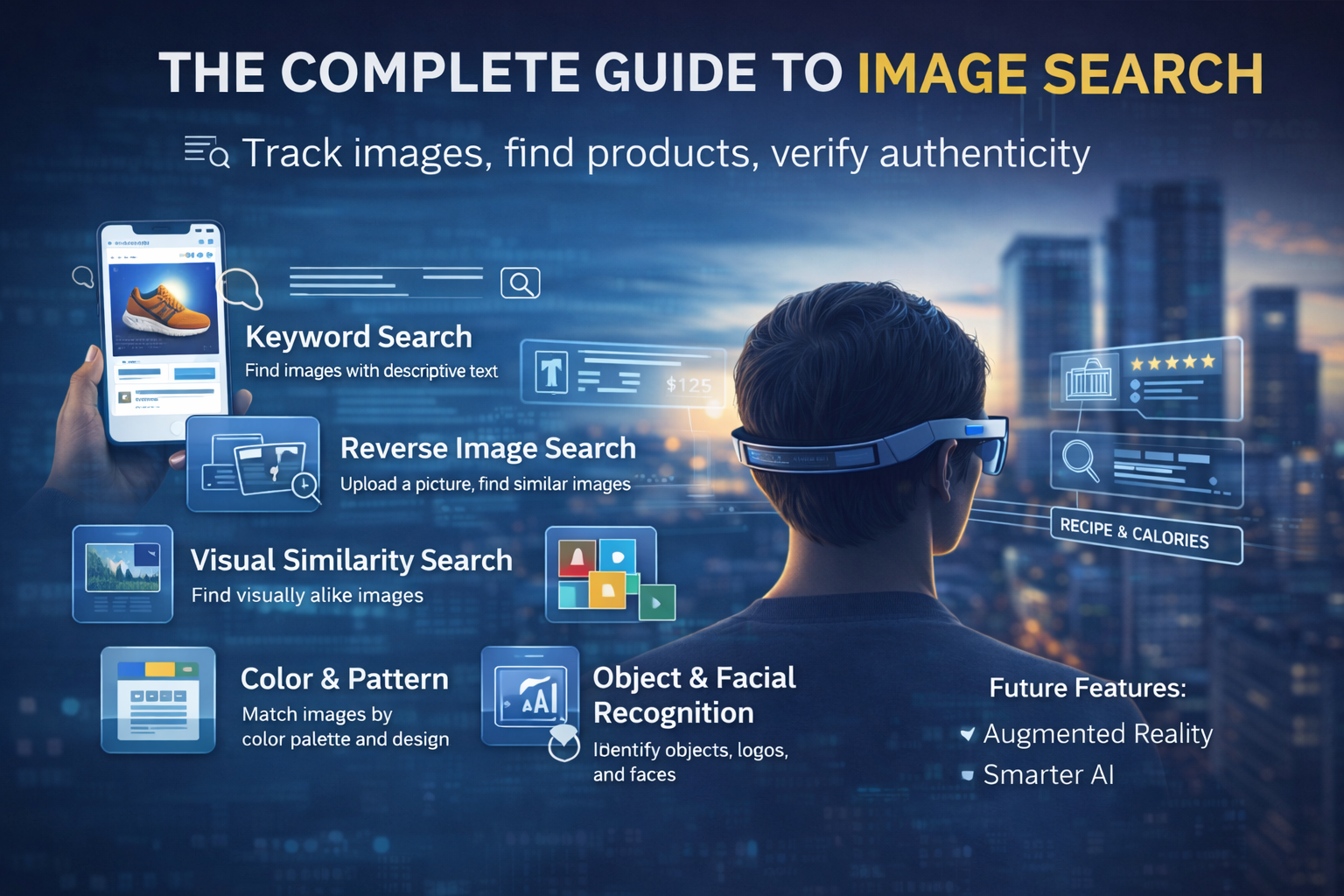
Image Search Techniques Ever tried to remember where you saw a photo but couldn’t think of a single keyword to search for it? Or spotted a product online and thought, “I want this—how do I find it again?” That’s exactly where image search techniques save the day.
Right now, Image Search Techniques dominate the internet. Scroll through social media, browse eCommerce stores, or read the news—visuals lead the conversation. People understand pictures faster than text, trust them more, and use them to make decisions in seconds. So knowing how to search using images isn’t just a cool trick anymore. It’s a core digital skill.
In this complete guide, you’ll learn:
-
What Image Search Techniques really is
-
How Image Search Techniques works behind the scenes
-
Different types of image search and when to use each
-
The best tools for image search (and what they’re best at)
-
Common mistakes to avoid
-
Real-world use cases
-
Where image search is heading in the future
By the end, you’ll be able to track images, verify their authenticity, find products by photo, and use visuals more powerfully in both your personal and professional life.
What Is Image Search Techniques?
Let’s start simple.
Image Search Techniques is the process of finding images on the internet based on either:
-
Text (keywords, phrases, descriptions), or
-
A picture (an image you upload or link to)
You’re no longer limited to typing “red shoes” or “sunset beach wallpaper” and hoping for the best. Today, you can:
-
Upload a photo
-
Paste an image URL
-
Take a picture using your camera
let the search engine scan it, recognize what’s in it, and show you visually similar images or even the exact same one from across the web.
This is incredibly useful when:
-
You want to find the original creator of a photo
-
You’re trying to identify a product you saw on social media
-
You need to check if an image has been edited, faked, or misused
Journalists, digital marketers, eCommerce brands, content creators, and even casual users rely on image search every day. Why? Because visuals carry context, proof, and meaning that plain text simply can’t match.
Over the years, Image Search Techniques has evolved from simple keyword matching to sophisticated systems powered by machine learning and computer vision. Today’s tools don’t just read filenames and tags; they can understand objects, scenes, colors, styles, and sometimes even the context of what’s happening in the image.
How Does Image Search Actually Work?
On the surface, Image Search Techniques feels simple: you upload a picture or type a query and get results. Behind the scenes, though, it’s a complex dance between artificial intelligence, machine learning, and computer vision.
Here’s a simplified version of what happens.
Step 1: Input – Your Query
You give the system something to work with:
-
A keyword or phrase (e.g., “modern office desk with drawers”)
-
An image (uploaded, dragged and dropped, or via URL)
Step 2: Image Breakdown
If you upload a picture, the search engine doesn’t see “a nice living room.” It breaks the image down into digital features such as:
-
Colors and gradients
-
Textures and patterns
-
Edges and shapes
-
Objects and their positions
Think of it as turning a picture into a detailed fingerprint the system can compare.
Step 3: Matching Against a Massive Database
The search engine compares those visual features against billions of images indexed from websites, platforms, and sometimes internal databases.
It looks for:
-
Exact matches
-
Near-duplicates (cropped, resized, filtered versions)
-
Visually similar images with comparable shapes, colors, or layouts
For text-based searches, it also uses:
-
Image titles and filenames
-
Alt text and captions
-
The text around the image on the page
That’s why adding descriptive alt text on websites is so powerful for SEO and image discovery.
Step 4: Understanding Context
Modern systems don’t stop at shapes and colors. Deep learning models can recognize:
-
Objects (e.g., bag, car, dog, laptop)
-
Places (e.g., Eiffel Tower, beach, office)
-
Certain brands or logos
-
Sometimes even the purpose (e.g., “product image”, “meme”, “screenshot”)
For example, if you upload a photo of a red handbag, the algorithm analyzes:
-
Color: shades of red
-
Shape: rectangular, rounded, bucket style, etc.
-
Details: straps, zippers, logos, texture
Then it Image Search Techniques for similar handbags—often showing products from online shops or visually related items. Upload a landmark instead? You’ll likely get the location, nearby attractions, and travel info.
In short: text search looks at words. Image search looks at pixels, patterns, and context.
Main Types of Image Search Techniques

Different goals call for different techniques. Once you understand the main types of image search, you’ll know exactly which method to use and when.
1. Keyword-Based Image Search
This is the classic method most people already know.
You type in a descriptive phrase—like:
-
“Minimalist home office desk”
-
“Healthy breakfast bowl”
-
“Blue neon city wallpaper”
the search engine returns images that match those words.
How it works:
Keyword search relies heavily on:
-
Image titles and filenames
-
Alt text and captions
-
Metadata and page content
If the site owner did a good job describing their image, it’s easier for you to find it.
When it’s useful:
-
When you’re looking for general visuals (e.g., stock-looking photos, icons, backgrounds)
-
When you have a clear idea in words of what you want
-
When you’re browsing for concepts, not specific images
Example: Search “sunset over snowy mountains” and you’ll get pages of images matching that description.
2. Reverse Image Search
Reverse image search flips the usual search flow. Instead of words, your query is the image.
You:
-
Upload a photo
-
Paste an image URL
the system tries to find:
-
Exact matches
-
Near-identical images (cropped, resized, color-adjusted)
-
Pages where the image appears
Why it’s powerful:
-
You can find the original source of a picture
-
You can detect stolen or misused images
-
You can check if a viral image is old, edited, or out of context
This makes reverse image search invaluable for:
-
Journalists verifying visuals before publishing
-
Photographers tracking unauthorized use
-
Brands protecting their visual assets
-
Anyone checking fake news or manipulated photos
If you suspect a photo was taken from somewhere else, reverse searching can show you every place it appears online.
3. Visual Similarity Search
Reverse image search and visual similarity search sound similar, but they’re not identical.
-
Reverse search: Tries to find the same image (or modified copies).
-
Visual similarity search: Tries to find images that look like the original—even if they aren’t copies.
Here, the system focuses on:
-
Layout and composition
-
Color combinations
-
Textures and patterns
-
Overall aesthetic
Where it shines:
-
Fashion (find clothes that look similar to a piece you like)
-
Interior design (similar furniture, decor, or mood)
-
eCommerce (alternatives to a specific product)
Imagine you love a particular sofa but it’s out of budget. A visual similarity search can show cheaper or alternative options that have the same style, color, or silhouette. It’s like saying, “Show me more like this.”
4. Color and Pattern-Based Search
Sometimes, what matters most isn’t the object, but the look—the colors, tones, and patterns.
Color and pattern-based search lets you:
-
Filter images by specific colors
-
Match visuals to a brand palette
-
Find designs with certain patterns (stripes, dots, geometric shapes, etc.)
Designers, advertisers, and brand managers love this, because it helps maintain visual consistency across campaigns.
Use cases:
-
You’re building a campaign using specific brand colors and need images that fit that palette.
-
You’re designing a website with a particular tone (pastel, neon, earthy) and need matching visuals.
Many platforms and stock sites let you filter by color, making it easy to find visuals that “feel” right at a glance.
5. Object and Facial Recognition Search
This is where image search gets seriously advanced.
Object and facial recognition use AI to identify:
-
Faces and people
-
Logos and brand marks
-
Vehicles and everyday objects
-
Animals, products, even some types of handwriting
Who uses this:
-
Law enforcement (identification, missing persons, security footage analysis)
-
Media and newsrooms (verifying people and places in images)
-
Social platforms (tagging people, detecting harmful content)
-
Brands (tracking logo usage or product presence)
Example: Facial recognition can check if the same person appears in multiple photos. Object detection might identify specific items like “red sedan,” “golden retriever,” or “kitchen appliance.”
These techniques make searches more precise and enable tasks that weren’t possible with keywords alone.
When Should You Use Each Image Search Technique?
Choosing the right method is half the battle. Here’s a quick guide:
-
Keyword-based search
Use it when you:-
Need general visuals
-
Have a clear text description
-
Are brainstorming ideas or concepts
-
-
Reverse image search
Use it when you:-
Want to find the source of an image
-
Need to check authenticity
-
Suspect plagiarism or misuse
-
-
Visual similarity search
Use it when you:-
Want alternatives for fashion, decor, or products
-
Care about style and aesthetics
-
Are turning inspiration into specific options
-
-
Color and pattern-based search
Use it when you:-
Need strict brand consistency
-
Are working on design-heavy projects
-
Want images that match certain tones or patterns
-
-
Object and facial recognition
Use it when you:-
Need identification and verification
-
Are working in security, media, or analysis
-
Want to detect specific items or people in images
-
You can also combine methods. For example:
-
A marketer might use a keyword search to find ideas,
-
Then use reverse image search to locate the original creator,
-
And finally check usage rights before using the image.
The more familiar you are with each technique, the more precise and efficient your searches become.
Top 7+ Tools for Image Search (And What They’re Best At)
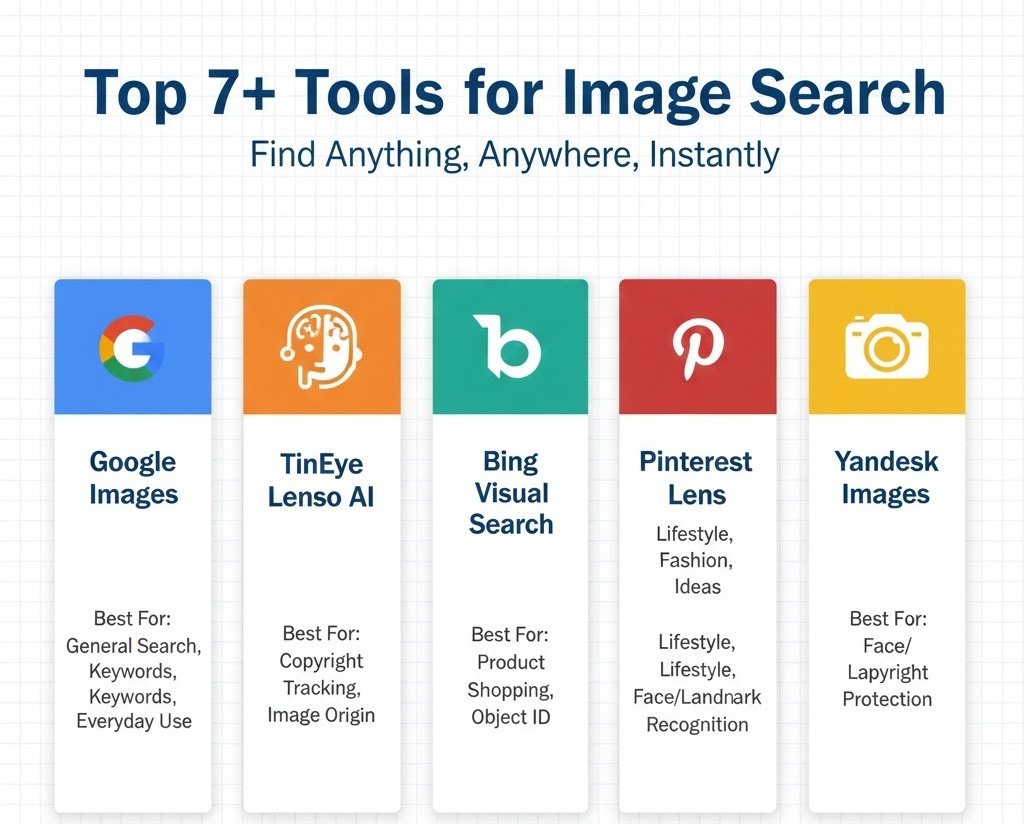
There are many tools out there, but a few stand out. Each one has its strengths, so think of them as different lenses for looking at the visual web.
1. Google Images – The All-Rounder
Best for: Keyword search, basic reverse search, everyday use.
Google Images is still the default starting point for most people. It supports:
-
Keyword-based searching
-
Reverse image search (upload or paste URL)
-
Filtering by size, color, type, time, and usage rights
Its massive index and smart algorithms mean you’ll often find:
-
Exact or similar images
-
Pages where those images appear
-
Topic suggestions related to your query
If you’re just starting out or need a general-purpose tool, Google Images is usually your first stop.
2. Lenso AI – Powerful Face and Reverse Image Search
Best for: Face search, fraud detection, tracking stolen visuals.
Lenso AI specializes in AI-powered reverse image search with a strong focus on:
-
Finding where your photos appear online
-
Detecting exact duplicates and close matches
-
Spotting potential identity misuse (catfishing, fake profiles)
One standout feature is alerts: you can get notified when new matches for your image appear online. With advanced filtering and sorting, it helps you refine results and focus on what matters.
For creators, professionals, or anyone worried about image misuse, Lenso AI is a strong ally.
3. TinEye – Tracking Image Origins and Duplicates
Best for: Copyright tracking, authenticity checks, change detection.
TinEye is a specialist in reverse image search and is widely used by:
-
Photographers
-
Journalists
-
Brands and agencies
It excels at:
-
Finding where an image first appeared
-
Tracking modified versions (cropped, edited, resized)
-
Spotting unauthorized reuse
Even if the image has been slightly changed, TinEye often still recognizes it. That makes it a go-to tool for protecting creative work and verifying whether an image is genuine or manipulated.
4. Bing Visual Search – Great for Shopping and Object Identification
Best for: Shopping by image, identifying objects inside photos.
Bing Visual Search makes searching more interactive. You can:
-
Upload a photo
-
Highlight a specific area or object in the image
Then Bing finds:
-
Similar products
-
Related items and visuals
This is particularly useful for online shoppers who see a product in an image and want to find where to buy it—or see alternatives.
With integration in Microsoft Edge, you can right-click an image and search visually without leaving the page, making it fast and convenient.
5. Pinterest Lens – Ideal for Lifestyle, Fashion, and Décor
Best for: Inspiration, lifestyle content, creative ideas.
Pinterest Lens is built for discovery. You:
-
Take a photo
-
Upload an image
Pinterest shows you:
-
Related outfits
-
Interior design ideas
-
DIY projects, recipes, and more
It shines in:
-
Home décor
-
Fashion and styling
-
Lifestyle and creative inspiration
If you’re a content creator, designer, or just someone who loves visually exploring ideas, Pinterest Lens can turn everyday images into endless inspiration.
6. Yandex Images – Strong in Reverse Image Recognition
Best for: Face recognition, landmarks, and cross-checking results.
Yandex, a major Russian search engine, is surprisingly powerful for image recognition, especially for:
-
Faces
-
Objects
-
Landmarks
Many professionals use Yandex as a second opinion alongside Google or Bing because sometimes it surfaces matches that others miss.
When you need deep or exhaustive image research—especially around faces and locations—Yandex Images is a valuable alternative.
7. Shutterstock – Copyright Protection and Image Tracking
Best for: Creators and brands protecting licensed images.
Shutterstock is known as a stock photo platform, but it also offers a robust reverse image search for registered users.
With it, creators and companies can:
-
Check where their licensed content appears online
-
Track potential misuse or unauthorized distribution
-
Protect intellectual property more effectively
This helps enforce rights, encourage ethical use of visuals, and gives professionals more control over their work.
Best Practices for Effective Image Searching

Want better, faster, more accurate results? A few simple habits can level up your image search game.
1. Use High-Quality Images
For reverse or visual searches, start with:
-
High-resolution images
-
Uncropped, unblurred versions if possible
Low-quality or heavily edited images can confuse algorithms, leading to poor or irrelevant results.
2. Be Specific With Keywords
When you’re using text-based search, details matter.
Compare:
-
“Shoes” vs “black leather running shoes for men”
-
“Dog” vs “golden retriever puppy playing in grass”
The more specific you are, the more accurate your results will be.
3. Use Multiple Tools
Don’t rely on a single search engine for everything.
-
Google for general tasks
-
TinEye for duplicates and origin tracking
-
Pinterest Lens for creative inspiration
-
Lenso AI or Yandex for people and deep reverse searches
Each tool indexes the web differently and uses its own algorithms. Combining them gives you a fuller picture.
4. Take Advantage of Filters
Most search platforms let you refine results by:
-
Size
-
Color
-
Type (photo, illustration, clip art)
-
Time (recent vs old)
-
Usage rights
Filters help you quickly narrow down to visuals that are:
-
Relevant
-
High-quality
-
Legally safe to use
5. Respect Copyrights and Usage Rights
This one’s big.
Always:
-
Check whether an image is free to use, requires attribution, or needs a license
-
Read usage rights on stock sites and search filters
-
Avoid using copyrighted images casually in commercial projects
Ethical searching doesn’t just protect you legally—it also supports the creators who make the content you rely on.
Common Mistakes to Avoid in Image Search
Even experienced users trip over a few recurring issues. Here’s what to watch out for.
1. Using Cropped or Over-Edited Images
Heavily cropped, filtered, or distorted pictures:
-
Hide important visual features
-
Make it harder for algorithms to match them
-
Often lead to fewer or irrelevant results
Whenever possible, use the original, unedited image.
2. Depending on Only One Search Engine
Every search platform has blind spots.
If you rely just on Google or just on one tool:
-
You might miss important matches
-
You limit your results to one index and algorithm
Cross-checking with multiple tools is especially important when:
-
Verifying news and media
-
Investigating plagiarism or fraud
-
Doing serious research or journalism
3. Ignoring Usage Rights
It’s easy to find a nice image and click “save,” but:
-
Not checking licensing can expose you to legal risk
-
Using copyrighted visuals without permission can lead to takedowns or worse
Always check: is it Creative Commons? Free for commercial use? Attribution required? Licensed stock?
4. Overcomplicating Your Queries
Sometimes, people throw too many vague keywords into the search bar.
For example:
“nice cool design modern website blue kind of futuristic tech but simple”
That’s confusing—for both humans and algorithms.
Aim for clear, focused phrases instead:
-
“minimalist blue tech website landing page”
Simplicity and clarity usually win.
Practical Applications of Image Search
Image search isn’t just for curiosity. It’s quietly powering important processes across many fields.
1. Journalism and Media Verification
Journalists use image search to:
-
Check whether a photo is original or repurposed
-
See if an image has been used in older, unrelated stories
-
Detect manipulated or misleading visuals
This helps combat fake news and ensures more accurate reporting.
2. eCommerce and Online Shopping
Retailers and marketplaces use visual search to let you:
-
Upload a product photo
-
Instantly get links to the same or similar items
That improves:
-
User experience
-
Product discovery
-
Sales conversions
It’s like shopping with your camera instead of your keyboard.
3. Design and Creative Work
Designers, photographers, and marketers use image search to:
-
Gather visual inspiration
-
Explore styles and trends
-
Maintain brand consistency with color or pattern-based searches
Rather than copying, they use these techniques to spark ideas and refine their direction.
4. Education and Research
Students and educators rely on image search for:
-
Visual aids and diagrams
-
Historical photos and references
-
Verifying sources and authenticity
It supports more engaging, visually rich learning experiences.
5. Law Enforcement and Security
Authorities use facial and object recognition to:
-
Identify suspects
-
Track stolen items
-
Detect counterfeit goods
The ability to match visual patterns quickly can make a huge difference in investigations.
6. Marketing and Brand Protection
Brands monitor where their:
-
Logos
-
Campaign visuals
-
Product images
appear online. This helps them:
-
Spot unauthorized use
-
Measure campaign reach and impact
-
Protect brand reputation
7. Social Media Monitoring
Influencers and content creators often:
-
Track reposts
-
Find uncredited shares of their content
-
Manage collaborations and brand mentions
Image search makes it easier to see how far a visual has traveled.
The Future of Image Search
We’re only at the beginning of what image search can do.
As AI and machine learning evolve, we’ll see:
-
Even higher accuracy in recognizing objects, scenes, and environments
-
Systems that detect not just what is in an image, but how it feels—emotion, mood, atmosphere
-
Better understanding of user intent, not just user input
Add in augmented reality (AR) and wearables, and things get even more interesting.
Imagine:
-
Pointing your phone at a building and instantly seeing its history, reviews, or offices inside
-
Snapping a meal and getting the recipe, calorie count, or restaurant
-
Looking at a product through smart glasses and seeing price comparisons and reviews in real-time
Alongside all this, privacy and ethics will become central issues. Questions around:
-
Face recognition
-
Surveillance
-
Consent
-
Data ownership
will shape how far and how fast this technology spreads. Done responsibly, future image search will feel less like “searching” and more like having an intelligent visual assistant at your side.
Conclusion
Image search has transformed how we navigate the visual web. From verifying a suspicious photo to finding the exact shoes you saw on Instagram, the right technique can save time, protect you from misinformation, and open up a world of creative possibilities.
Keyword search, reverse search, visual similarity, color-based search, and facial or object recognition each have their own strengths. The trick is matching the right method—or combination of methods—to your goal.
Whether you’re a student, marketer, journalist, designer, or just a curious user, understanding these tools turns you from a passive scroller into an active visual investigator.
Think of image search as learning a new digital language—the language of visuals. The more fluent you become, the more doors open:
-
You’ll find better resources
-
Protect your work and your brand
-
Make smarter shopping and research decisions
-
And move through the web with more confidence and control
Start experimenting with different tools and techniques now. The earlier you master them, the better prepared you’ll be for an internet where images speak louder than ever.